EIS/DRT Heatmap
Combine multiple DRT results into a tau-versus-sample contour heatmap.
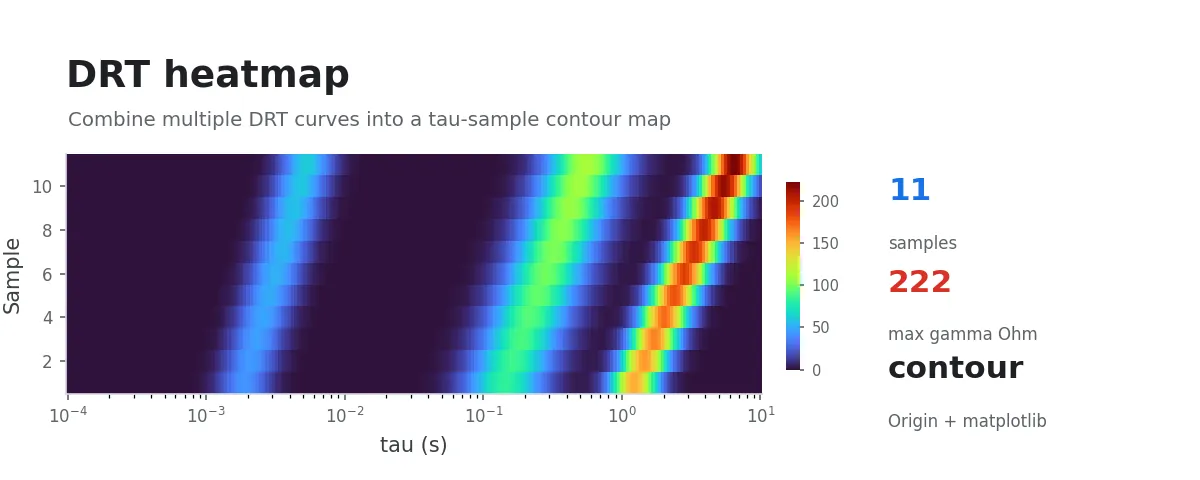
After running DRT analysis on a set of in-situ EIS measurements (across different potentials or time points) or a series of samples (different conditions, different concentrations), overlaying all the γ(τ) curves on a single line plot quickly becomes unreadable. This workflow combines them into a single τ-versus-sample heatmap, using color to visually convey how the intensity of a given relaxation process evolves across conditions.
Input Data
Choose one of the following input types:
- A
drt_output/directory that already containsdrt_data.csvfor each sample - A folder of raw EIS data, or a multi-selected group of raw EIS data files
At least 2 samples are required.
Procedure
Select a directory, or multi-select a group of EIS data files. The program automatically:
- Detects the input type (
drt_output/or raw EIS data) - Invokes the DRT solver if needed, caching each sample's
drt_data.csvtodrt_heatmap/drt_output/<sample>/ - Takes the intersection of all samples' τ ranges, builds a 200-point logarithmic common grid, and linearly interpolates γ(τ) on the log-τ axis
- Naturally sorts the sample names
Y-axis heuristic:
- If every sample name ends with an integer that can be extracted, and those integers are all distinct (e.g.,
in_situ_001,in_situ_002, ...), the Y-axis mode isindex. Those integers become the Y values, and the axis is labeledSample Index. - Otherwise the workflow falls back to
ordinalmode: Y values are1..N, and the Y-axis ticks use the sample names (attempted in Origin via LabTalk; on failure, the axis falls back to numeric ticks with a console warning).
The console prints the active mode for easy debugging.
Output
drt_heatmap.png: matplotlib heatmap, with τ on the x-axis (log scale) and the y-axis determined by the heuristicdrt_heatmap.opju: Origin project — the primary deliverable for subsequent editing. The x-axis storeslog₁₀τvalues (the title readslog₁₀τ); this avoids the visual mismatch you would get if you laid linearly-spaced matrix cells under a log axis. Both the raw heatmap and the clipped variant (when applicable) live in the same opju (separate matrix books + separate graph windows, suffixed_rawand_clipped); switch between them via Project Explorer. The project also includes aSample_Metaworksheet with three columns —index/sample/y_value— whose row order matches the heatmap's y-axis one-to-one, so you can map indices back to sample names when customising the y ticksdrt_heatmap_clipped.png: clipped heatmap variant. DRT results often contain a single dominant peak that is much higher than every other feature, which stretches the color scale and washes out all secondary relaxation processes. This file caps the color-scale upper bound at 120% of the second-tallest peak height (computed withscipy.signal.find_peakson each sample's γ(τ); the program takes the largest "second peak" across all samples, then multiplies by 1.2). Cells above the threshold are rendered with the top color of the scale. If every sample has only one peak, the clipped variant is skipped and a console message is printed.drt_heatmap_matrix.csv: the interpolated γ matrix (not clipped), with the first column holding sample names, the second column the Y values, and the remaining columns headed by τsamples_meta.json: recordsy_mode,y_label,input_kind, and the sample-to-Y-value mapping
Intermediate DRT results are also written to drt_heatmap/drt_output/<sample>/drt_data.csv for reuse.
Principle (Brief)
Each sample's γ(τ) is interpolated onto a unified logarithmic τ grid, producing a matrix , where indexes the sample (y dimension) and indexes τ (x dimension). The heatmap encodes as color, making the following readable at a glance:
- How the peak corresponding to a given relaxation process shifts along τ as conditions (potential/time) change
- Relative changes in peak intensity across samples
FAQ
- Why does it report "tau range no overlap"? If the frequency ranges of different samples do not overlap at all, the common τ grid cannot be constructed. Check the
freq_hzcolumn of the input data. - How is the sample order determined? Natural sort:
sample_001 < sample_002 < sample_010. If you do not want name-based ordering, rename the files beforehand. - What if Origin custom Y ticks fail? The program catches the exception and falls back to numeric ticks. The
.opjustill opens correctly; only the Y-axis labels switch from sample names to1, 2, 3, ....
Practical Tips
For in-situ EIS data (sampled by time or potential), embed strictly increasing integer indices in the sample names (e.g., _001, _002). The y-axis will then automatically use those indices as coordinates, making it easy to align with other in-situ curves.